MacBook Air

The best device for video editing.

Satok CyWarrior

Your friendly reviewer for latest technology and gadgets including jailbreaking.

All The Gadgets Reviewed

From Blackberry to Apple to Android, we promised to give you our 2 cents.

Nothing gets better than this!!

No matter where you are we will bring the review to you!!!.

Feel Free to drop us a few lines

We welcome all feedback.

RSS Headline

Friday, 15 October 2010

Root Your Droid using SuperOneClick Rooter!

DROID one-click rooter, SuperOneClick

by Matthew Billy on October 15, 2010


If you’re a Droid user, you are most likely familiar with the various “one-click” rooting tools we have had come and go. SuperOneClick is now the latest and greatest rooting method for Android phones. The program essentially works via adb-commands, without having the Android SDK installed. So what makes this any differen’t from the other one-clicks? Unlike the others, any Windows user can run this quick root and there needs to be no knowledge of SDKs. I have tested it out on my DROID 1, as well as DROID X, and it has worked great!
Do you want to try this method out for yourself? Follow the break to droid-life’s step by step guide.


Basic Instructions:
(Remember, Everythingandroid.org, and it’s writers are not responsible for any damage that could occur to your phone from following the instructions in this article.)
1.  Download the latest SuperOneClick.zip file to your Windows computer.  Find it here.
2.  Extract the files from the .zip file into a new folder on your PC.
3.  Plug your phone in to your PC and turn on USB debugging.
Settings>Applications>Development>USB Debugging
4.  Open the folder with the SuperOneClick contents and double click “SuperOneClick.exe”.
5.  Allow the process to run and enjoy being rooted.
If you have any questions, comments, or problems with this root method, let us know below!

4G Signal in Malaysia!

October 15, 2010 10:07 AM

Only Nine Telcos Get 4G Apparatus Assignments For Time Being, Says MCMC 
By Tengku Noor Shamsiah Tengku Abdullah

CYBERJAYA, Oct 15 (Bernama) -- The government has not assigned the 4G spectrum to any telecommunication company as yet but had merely given apparatus assignments (AA) to nine telcos to pave the way for the early adoption of the long-term evolution (LTE) or 4G technology mobile services, said Malaysian Communications and Multimedia Commission Chairman Tan Sri Khalid Ramli.


Citing that there was a difference between AA and Spectrum Assignments (SA), he said MCMC only awarded the AA for them to use the 2600MHz spectrum band to roll out their 4G wireless broadband services and had not given them the Spectrum Assignment (SA).


"The decision to award to the nine telcos was made after a lengthy consultative and deliberation process with various technical groups which started about two years ago. It was not something which was done a month ago," he told Bernama.


Khalid said the nine telcos, which had been picked based on their experience, technological capability in promoting innovation and financial strength, had been asked to submit detailed business plans by year-end on what they planned to do.


An apparatus assignment confers rights on a company to use the spectrum to operate a network facility of a specified kind at a specified frequency or in any specified frequency band or bands.


4G, which refers to the fourth generation of cellular wireless technology standards, is the successor to 3G and 2G families of standards. 4G technology can deliver 100 Mbps or megabits per second, which allows a music album to be downloaded as fast as five seconds or an hour-long TV show in about 30 seconds.


The companies that had been awarded the AA by MCMC include existing 3G and WiMAX players, and a new entrant. They are Celcom Axiata Berhad, Maxis Broadband Sdn Bhd, DiGi Telecommunications Sdn Bhd, U-Mobile Sdn Bhd, Asiaspace Sdn Bhd, Packet One Networks (M) Sdn Bhd, RedTone Marketing Sdn Bhd, YTL Communications Sdn Bhd and Puncak Semangat Sdn Bhd.


Khalid said MCMC may award the SA if it was satisfied with the business plan and service readiness of the telcos in installing their equipment and services.


These companies were also required to pay annual fees to MCMC in order to use the AA to roll out their 4G services and would not receive grants of any kind from MCMC or from the Universal Service Provision (USP) Fund, which was specifically for developing communications facilities in the rural areas, he explained.


"If they want a piece of action, they will actually have to pay for it," he said, adding that the government would consider giving the SA later on if they could prove their capability.


"We may decide on that later on. In the past, we did allocate the spectrum at a much higher fee. This stage hasn't come as yet (for 4G)," he said in likening MCMC as the regulator and custodian of the Malaysian spectrum.


Khalid also said the government may decide to take back the spectrum if some companies did not perform up to expectations.


Asked why MCMC had decided to award the AA to nine telcos instead of only few like the current market leaders in the country, for example, Khalid said this was based on the need for greater transparency and competition.


Under the provisions of the Communication and Multimedia Act, he said MCMC had to act for the long-term benefit of end-users while taking on a technology-neutral approach.


On why MCMC was initiating 4G technology now while some telcos had yet to provide the full range of 3G or WiMAX technology services, Khalid explained that the regulator was planning for the future.


At certain times in Kuala Lumpur, network congestion occurred due to sharp demand and MCMC had to start work on 4G now to avoid a breakdown in services later, he said.


"It is time to migrate to something better," he stressed.


-- BERNAMA

PAS Youth Slaps Anwar Without Condoms On?!!

PAS extremist begins their attack on 'gay'.  Is this the true colors for PAS? All this while there are supporting Gay Party which is the Parti Keadilan Rakyat?  Suddenly, they channeled their anger towards Adam Lambert? Is it because they cannot tolerate anymore when all this while ,allegations and police reports were being made accusing Anwar Ibrahim, which is PAS allied for Pakatan Rakyat being 'gay'.  In fact, the correct term is it bi-sexual?

Earlier today, many papers reported that Anwar did not use condoms when sodomising his assistant,  In one case, he sodomised the poor chap for the eighth times without using any condoms at all?  Is he trying to promote HIV? When he himself knows that gay sexual behaviour will encourage more HIV among the party members?

Why is the PAS Youth only concerns about Adam Lambert who by rights practices safe sex when they  could ignore Anwar's immoral practice?  PAS should re-evaluate their partnership with PKR since all evidence pointed towards Anwar being gay!!!

However, one could even say that maybe PAS loves it from behind!!!?
PAS objects to Adam Lambert concert

October 14, 2010


KUALA LUMPUR, – PAS today demanded that authorities cancel a planned concert by US glam rocker Adam Lambert that they say is promoting “gay culture” in the mainly Muslim country.


PAS has also threatened to call “as many of its members and supporters” to proselytise to concert-goers if the performance by the former “American Idol” runner-up goes ahead on Thursday, a party official said.


“Adam Lambert’s shows... are outrageous, with lewd dancing and a gay performance that includes kissing male dancers, this is not good for people in our country,” said PAS Youth leader Nasrudin Hasan. Homosexual sex is a criminal offence in Malaysia.


PAS is Malaysia’s second-largest political party with close to a million members and is a partner in a rainbow opposition grouping led by former Deputy Prime Minister Anwar Ibrahim.


Foreign acts often draw protests from PAS, which since 2007 has campaigned against performances by singers including Beyonce, Rihanna, Gwen Stefani, Avril Lavigne and Mariah Carey.


Police in May broke up a demonstration by Islamists including PAS supporters protesting against a concert by US rapper Pitbull, underscoring a deepening tide of Islamic conservatism in the country.


An official from the Arts, Culture and Heritage Ministry was reported saying that the singer had signed a contract agreeing to abide by the ministry’s rules on performances, which can require foreign performers to tone down their acts to suit local sensibilities. – Reuters
 

Thursday, 14 October 2010

DAP Sibu behind the Logjam Disaster?

‘Logjam a man-made disaster’

by Peter Sibon. Posted on October 14, 2010, Thursday

KAPIT: Land Development Minister Dato Sri Dr James Jemut Masing has declared the recent logjam that clogged the Baleh and Rajang rivers a “man-made disaster”.

SABOTAGE: Is DAP behind all this un-natural event?
Masing warns of more such river destructions if uncontrolled logging unchecked

He said ecological devastation at Ulu Melatai, one of the tributaries of Baleh River, could be the main contributor to last week’s disaster.

However, the Baleh assemblyman said the Baleh River’s other tributaries could also have contributed to the devastation.

Baleh River has at least 10 tributaries similar to Ulu Melatai, such as Seranai and Entuloh.

“It is a man-made ecological disaster. It created a mud pool, which completely wiped out the flora and fauna in the area. This includes animals and fish,” Masing told The Borneo Post after a site visit to Ulu Melatai yesterday.

Ulu Melatai is located some 100km southeast of Kapit town and is very close to the Kalimantan border.

With Masing were political secretary to the Chief Minister Angeline Umis, Kapit District Officer Simon Japut Tiok and Kapit district councillor Tan Kian Hoo.

Masing attributed the devastation at Ulu Melatai to extensive logging with little or no control by the authorities.

“It is as if the loggers are in a hurry to clear the whole area above the proposed Baleh hydroelectric power dam, which is currently under feasibility studies,” he said.

He warned that more similar incidents could happen again if such manner of logging was allowed to continue.

Besides, he said, the soil along the Baleh tributaries was loose and heavily churned up by logging activities, which could easily turn into mudslides by prolonged heavy rain.

While the government’s policy on forest management was very clear, he said, greater implementation and enforcement were needed.

“I would like to urge the big boys to stop sub-contracting the jobs to others to prevent illegal logging and gangsterism in the area,” he said, adding that no such incident occurred when large companies operated in the area over the last three decades.

He added that this was the third such incident to happen at Baleh River, causing havoc to the local community.

The first was recorded in 2008 at Sg Ga’at, while last year a similar incident happened at Sg Tutoh.

According to him, the upper reaches of Baleh River are a very hilly and rugged terrain, making logging very dangerous. In a related incident, two people reportedly died in that area when the bridge was swept by the mudslide.

Both bodies have been found.

Wednesday, 13 October 2010

How to create a Facebook Group

Facebook has launched a new Group feature that allows people to build a social network within the social network. Here’s a step-by-step guide to how to create a group.

By Claudine Beaumont, Technology Editor
Published: 2:48PM BST 07 Oct 2010

Facebook
Groups is a new feature that allows people to group their friends by interest, activity, or topic. You could set up a group for your netball team, your university or school project, or even to help organise a holiday or a trip.
It enables the members of a group to engage in a real-time conversation using Facebook Chat, share photos or videos that they only want other members of the group to see, and assign the group a special email address to make it easier to keep up with what’s being planned and discussed.

Facebook has always had a "groups" feature, but there are few key differences between the "old" and "new" Facebook Groups.

The "new" groups allows you to engage in group chats, and set up a single email address for the group, so that anything sent to that address will automatically appear on the group's wall. You can also set group notifications in the "new" groups tool, which means that every time something is posted to the group, all users will receive an alert. Don't worry, though, you can decide what kind of notifications you receive, so you're not deluged with alerts.

The "new" groups tool also allows you to post documents to the group; it's not the most fully featured collaborative document tool, but it does allow you to use a small amount of markup on your basic text document (such as bullet points and bold or italics), and it also saves a version history, so you can see what has been changed on the document.

Your list of "old" groups can still be found under your profile picture. There is currently no easy way to turn an "old" group in to a "new" group. Once your profile has been updated to make the "new" groups accessible from your profile page, you will no longer be able to create "old" groups, though you will still be able to access those "old" groups.

So, here's how to set up a group:

:: To create a new Facebook Group, go to www.facebook.com/groups. Some users will be able to access this new feature directly through their profile page; for the time being, others will still access the “old” groups option when they click on Groups under their profile picture. Use the special Facebook Group home page for now to ensure you’re using the right tools.

:: Give your group a name. Then decide who you would like to invite to the group – typing in the name of Facebook friends will automatically add them in to the box; you do not need to use an email address.

:: Select the privacy level for your group. By default, all groups are “closed”, which means that although your other Facebook contacts will be able to see which of your friends are in any given group, they will not be able to see any of the content of that group, such as wall posts, photos and news feeds. You could decide to set your group to “open”, which makes the list of members, and the content of the site, fully public; or you could choose “secret”, which keeps both the list of members and content of the group totally private.

:: Once you have set up your group, you can assign it an email address (on a first come, first served basis). This enables members of the group to send an email to the assigned address to turn their message in to a wall post on the group’s wall. To generate an email address for the group, you need to click on the “Edit Group” option on the group’s home page, and select the “Email address: choose for group” option. Your email address will be something like yourgroupname@groups.facebook.com.

:: You can also use a Group Chat function to talk to all the members of a group at the same time. If anyone from the group is offline when the chat takes place, they can still see the chat history when they log back on, so they don’t miss out on anything.

Jailbreak iOS 4.1 iPhone 4, 3GS, iPod touch 4G, iPad with GreenPois0n [How to Guide]


By Taimur Asad | October 12th, 2010


Chronic Dev Team has finally released GreenPois0n to the world. You can use it to jailbreak iOS 4.1 on iPhone 4, iPhone 3GS, iPod touch 4G / 3G and iPad. Support for iPod touch 2G and Apple TV will be added soon.


The following instructions will help you jailbreak iOS 4.1 on iPhone 4 and iPhone 3GS using GreenPois0n.


NOTE: If you rely on an unlock, do not update to iOS 4.1 yet as doing so will upgrade your baseband, making it impossible for now to unlock. Either use TinyUmbrella to update to iOS 4.1 without update baseband ( instructions here), or wait for PwnageTool which will help you cook custom firmware files for iOS 4.1 without the upgraded baseband.


Step 1: Download GreenPois0n from the link given below.


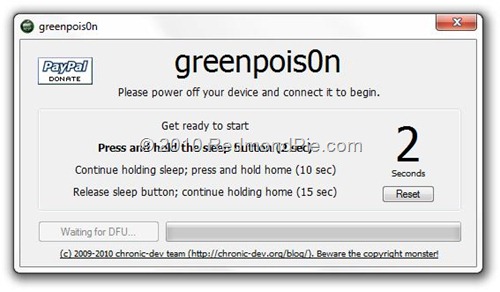
Step 2: Connect your iPhone via USB to your computer and click on “Prepare to Jailbreak (DFU)” as seen in the screenshot below.


Step 3: Now follow the following onscreen instructions:

Press and hold the sleep button for 2 seconds


Continue holding sleep; press and hold home for 10 seconds.


Release sleep button; continue holding home for 15 seconds.


Step 4: Your device is now ready for jailbreak. Click on “Jailbreak” to inject the exploit.


Step 5: Your iPhone
iPhone, iPad or iPod touch should now be successfully jailbroken on iOS 4.1 !


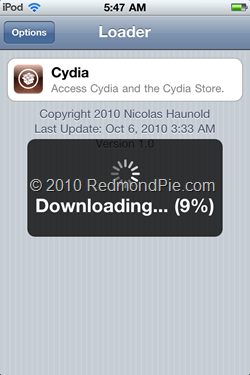
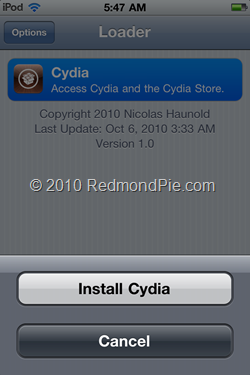
Step 6: Now start “Loader” found on the homescreen and install Cydia:


This is it! You are done ! 


Download GreenPois0n for Windows
Download iOS 4.1 for iPhone 4, 3GS, iPod touch 4G / 3G
Download iOS 3.2.2 for iPad 

Limera1n and Greenpois0n iPhone Jailbreak Tools Released!

By Bob Bhatnagar - 
Published October 13th 2010 


The jailbreak community has been active lately. Thanks to a surprise release of the limera1n jailbreak tool from Geohot, the release of Greenpois0n was delayed. Now both hacks use the same unpatchable bootrom exploit and are available to the iOS device-owning public.
In the meantime, the SHAtter exploit initially planned for Greenpois0n has been shelved for future use. Apple will surely fix the bootrom exploit in the next round of iOS hardware, however this time the jailbreak developers have a countermeasure ready for action.

Limera1n will jailbreak firmware 4.0, 4.01, 4.02, and 4.1 running on the iPhone 3GS, iPhone 4, iPod touch 3G , iPod touch 4G, and the iPad running iOS 3.2.2. Limera1n for Windows can be found at limera1n.com. The software is still a beta release and some users have reported problems. Future releases should support other platforms. The iPhone Dev-Team warns on their blog, "DO NOT USE LIMERA1N IF YOU USE THE ULTRASN0W CARRIER UNLOCK — wait for PwnageTool to incorporate the limera1n exploit. This is so that you can avoid updating your baseband and losing the unlock (possibly forever)."

Greenpois0n is also still under beta development. Right now it works for the iOS devices listed above but only when running iOS 4.1. Both Windows and Linux versions are available at greenpois0n.com. The Chronic Dev Team announced that support for Apple TV and iPod touch 2G jailbreaks are in the works, as well as a Mac version.

A wireless carrier unlock that will allow your locked iPhone to work with any compatible service provider is still under development. In the meantime, make sure to use TinyUmbrella to back up your SHSH files.

More explanation from the iPhone Dev-Team blog: "Because the 'untethered' part of this jailbreak comes from a userland hack from @comex, you should still backup your SHSH hashes for 4.1... This way you can always come back to an untethered, jailbreakable 4.1 on your devices after Apple has closed their 4.1 signing window (they’ll close the 4.1 window once they push out their next firmware version)."

As always, jailbreak tools for any and all iOS devices are released free of charge. There are many fake products that will scam users out of money. Never pay for a jailbreak tool unless you're voluntarily donating to the developers!

Nuffnang