MacBook Air

The best device for video editing.

Satok CyWarrior

Your friendly reviewer for latest technology and gadgets including jailbreaking.

All The Gadgets Reviewed

From Blackberry to Apple to Android, we promised to give you our 2 cents.

Nothing gets better than this!!

No matter where you are we will bring the review to you!!!.

Feel Free to drop us a few lines

We welcome all feedback.

RSS Headline

Showing posts with label greepois0n. Show all posts

Sunday, 6 February 2011

Jailbreak iOS4.2.1 UNTETHERED using greenpois0n on Window Now!!!

Untethered Jailbreak for Windows is finally here.  It was announced by Redmondpie earlier.  Now iPhone4 with iOS 4.2.1 can start enjoying their holiday and festive season by jailbreaking their iGadgets.

What a lovely angpow this year with the new release by Chronic Dev Team.  It has been the long wait since the last jailbreak for window platform.  What I can say is MARVELOUS!

I am updating my iOS as this thesis is being written. Saw this announcement through rockmelt from twitter account.   Those that wishes to follow me may do so @semicyber on twitter.

For clear methods and guideline to jailbreak just read through from the link provided below or watch the video.  Don't worry jailbreaking is not illegal and you won't want to isolate fun from iPhone4 by jailbreaking??


Wednesday, 13 October 2010

Jailbreak iOS 4.1 iPhone 4, 3GS, iPod touch 4G, iPad with GreenPois0n [How to Guide]


By Taimur Asad | October 12th, 2010


Chronic Dev Team has finally released GreenPois0n to the world. You can use it to jailbreak iOS 4.1 on iPhone 4, iPhone 3GS, iPod touch 4G / 3G and iPad. Support for iPod touch 2G and Apple TV will be added soon.


The following instructions will help you jailbreak iOS 4.1 on iPhone 4 and iPhone 3GS using GreenPois0n.


NOTE: If you rely on an unlock, do not update to iOS 4.1 yet as doing so will upgrade your baseband, making it impossible for now to unlock. Either use TinyUmbrella to update to iOS 4.1 without update baseband ( instructions here), or wait for PwnageTool which will help you cook custom firmware files for iOS 4.1 without the upgraded baseband.


Step 1: Download GreenPois0n from the link given below.


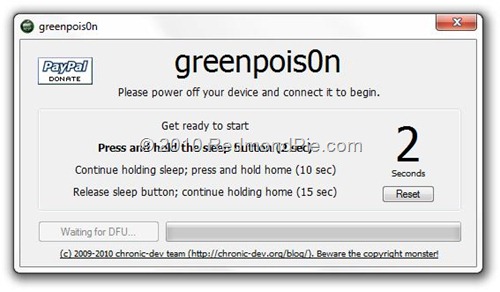
Step 2: Connect your iPhone via USB to your computer and click on “Prepare to Jailbreak (DFU)” as seen in the screenshot below.


Step 3: Now follow the following onscreen instructions:

Press and hold the sleep button for 2 seconds


Continue holding sleep; press and hold home for 10 seconds.


Release sleep button; continue holding home for 15 seconds.


Step 4: Your device is now ready for jailbreak. Click on “Jailbreak” to inject the exploit.


Step 5: Your iPhone
iPhone, iPad or iPod touch should now be successfully jailbroken on iOS 4.1 !


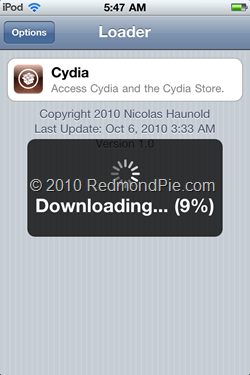
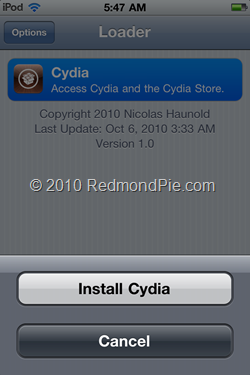
Step 6: Now start “Loader” found on the homescreen and install Cydia:


This is it! You are done ! 


Download GreenPois0n for Windows
Download iOS 4.1 for iPhone 4, 3GS, iPod touch 4G / 3G
Download iOS 3.2.2 for iPad 

Limera1n and Greenpois0n iPhone Jailbreak Tools Released!

By Bob Bhatnagar - 
Published October 13th 2010 


The jailbreak community has been active lately. Thanks to a surprise release of the limera1n jailbreak tool from Geohot, the release of Greenpois0n was delayed. Now both hacks use the same unpatchable bootrom exploit and are available to the iOS device-owning public.
In the meantime, the SHAtter exploit initially planned for Greenpois0n has been shelved for future use. Apple will surely fix the bootrom exploit in the next round of iOS hardware, however this time the jailbreak developers have a countermeasure ready for action.

Limera1n will jailbreak firmware 4.0, 4.01, 4.02, and 4.1 running on the iPhone 3GS, iPhone 4, iPod touch 3G , iPod touch 4G, and the iPad running iOS 3.2.2. Limera1n for Windows can be found at limera1n.com. The software is still a beta release and some users have reported problems. Future releases should support other platforms. The iPhone Dev-Team warns on their blog, "DO NOT USE LIMERA1N IF YOU USE THE ULTRASN0W CARRIER UNLOCK — wait for PwnageTool to incorporate the limera1n exploit. This is so that you can avoid updating your baseband and losing the unlock (possibly forever)."

Greenpois0n is also still under beta development. Right now it works for the iOS devices listed above but only when running iOS 4.1. Both Windows and Linux versions are available at greenpois0n.com. The Chronic Dev Team announced that support for Apple TV and iPod touch 2G jailbreaks are in the works, as well as a Mac version.

A wireless carrier unlock that will allow your locked iPhone to work with any compatible service provider is still under development. In the meantime, make sure to use TinyUmbrella to back up your SHSH files.

More explanation from the iPhone Dev-Team blog: "Because the 'untethered' part of this jailbreak comes from a userland hack from @comex, you should still backup your SHSH hashes for 4.1... This way you can always come back to an untethered, jailbreakable 4.1 on your devices after Apple has closed their 4.1 signing window (they’ll close the 4.1 window once they push out their next firmware version)."

As always, jailbreak tools for any and all iOS devices are released free of charge. There are many fake products that will scam users out of money. Never pay for a jailbreak tool unless you're voluntarily donating to the developers!

Nuffnang